
Hospital digital signage is now part of everyday healthcare communication, but a single screen on a wall hides a fair number of moving parts. When comms, IT, facilities and procurement teams sit down to plan a multi-screen rollout, the same practical questions come up: what sits behind the screens, what the hospital needs to supply, and what to ask a vendor. Those questions get more layered as a project moves from head office out into districts and individual clinics.
This is a plain-English guide. Read it once, and you should walk away knowing how hospital digital signage works, the components involved, and what makes a healthcare deployment different from putting a screen on a wall in a cafe. It is written for larger acute and tertiary hospitals running multiple screens, not single-room GP clinics.
What Is Hospital Digital Signage?
Digital signage is an umbrella term for the digital screens placed around a hospital, in both public and staff-facing areas. It covers more than a single product. In a healthcare setting, it usually includes:
- Digital displays on TV screens in public and staff areas
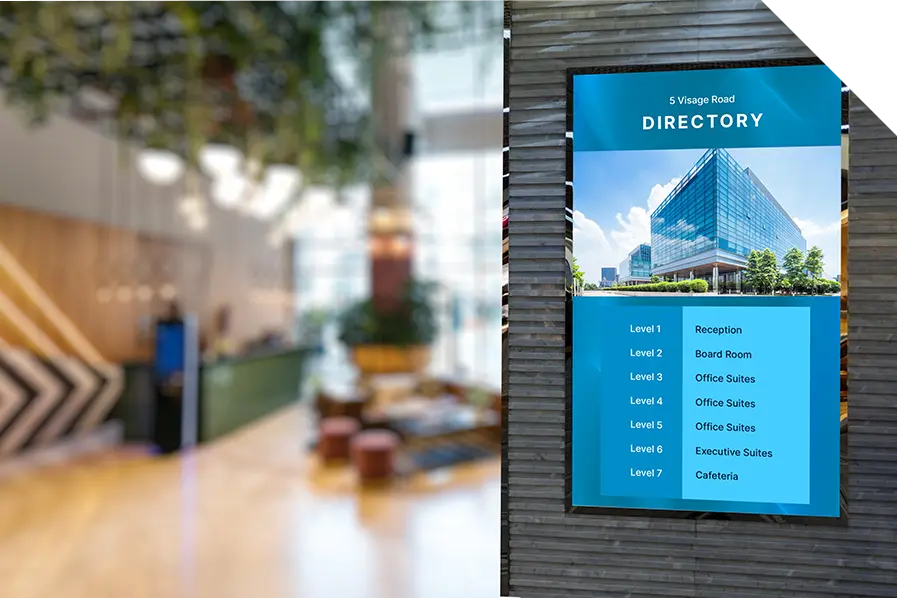
- Digital directories, often in foyers and often interactive
- Wayfinding screens that help people navigate the campus
- Queue calling displays that call patients when it is their turn
- Digital donor honour boards that recognise supporters and fundraising
The same screens do more than communicate with patients and visitors. Signage is used in staff-facing areas for internal messaging, in the hospital cafeteria for the daily menu, and in the pharmacy for retail promotions, all managed from the same platform.
The difference between this and a static poster or a regular TV comes down to control. A poster has to be printed, hung and taken down by hand, with no way to track it. A hospital’s digital signage and directories run on software, so a message can be scheduled, changed or translated in an instant and sent to one screen or hundreds.
How Does Digital Signage Work?
At the centre of any deployment is cloud-based software that lets a comms team manage content centrally, from any location. The day-to-day workflow comes down to three steps:
- Upload content. Add your media, including common file types such as .jpg, .png, .mp4 and HTML.
- Select players. Choose which screens on your network the content plays on.
- Schedule. Set the content to run on timing groups or specify exact timing.
From there, teams can pre-schedule campaigns in advance, make live updates, and pull in live data feeds such as dashboards or queue calling. Because it is cloud-based, there are no USB sticks and no walking screen to screen to swap content. You also get proof-of-play reporting, so you can confirm what ran, where and when, and drop that into a management report.
The Components of a Digital Signage Solution
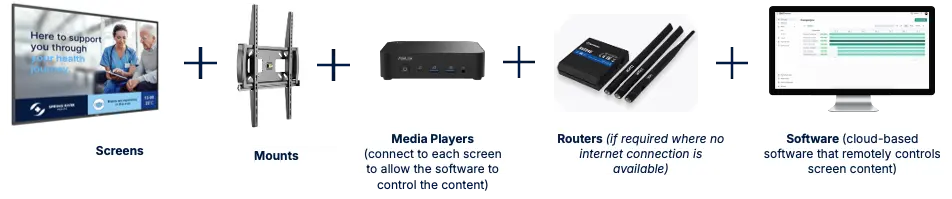
A working deployment is a small stack of parts rather than a single device. For each screen location, you are generally looking at:
- Screens. Commercial-grade displays built for continuous use, rather than a consumer TV.
- Mounts. The bracket or fixture that holds the screen in place.
- Media players. A small device connected to each screen. This is the piece that talks to the software and lets you control the screen centrally. As a rule, you have one media player per screen.
- Routers. Used where a screen location has no fixed internet connection available.
- Software. The cloud-based platform that remotely controls what every screen shows.
Get those five elements right, and the network behaves as one system rather than a set of unconnected screens.
Common Questions from Hospital Buyers
A handful of practical questions come up in almost every conversation. Here are short answers to the ones we hear most.
What is a media player?
It is the small device attached to each screen that connects it to the software. Without it, a screen is just a display. With it, the screen becomes part of your centrally managed network.
Can I put one message on many screens at once?
Yes. You select the players you want, and the same content plays across all of them, whether that is two screens or two hundred.
Can I control everything remotely?
Yes. Content is managed from the cloud-based software, so updates are made centrally and pushed out live, from wherever you are.
What is the difference between digital signage and queue calling?
Queue calling is one type of digital signage, used in clinics to call patients by number and often to show expected wait times. Digital signage is the broader category that queue calling sits within.
Can signage and queue calling run on the same screen?
Yes, through zoning. A single screen can be split so that, for example, queue calling runs in one zone while calming or educational content runs in another. More on zoning below.
What hardware do I need?
Screens, mounts, one media player per screen, software, and a router where there is no internet connection. A full-service vendor can supply and install all of it.
Can I reuse existing screens?
Often, yes. Where a screen is suitable, adding a media player can bring it into the network. It is worth having a vendor assess your current screens before you assume you need to replace them.
Why Healthcare Needs Are Different
A hospital is not a retail store, and the requirements reflect that. The clearest example is zoning, where a single screen carries more than one type of content at once. In a waiting room, you might run queue calling alongside an expected wait time and calming or educational content, which helps reduce crowding and anxiety. In a foyer, you might pair a digital directory with a dynamic roster of Visiting Medical Officers.
Integration is the other big difference. Signage that connects to your patient queue management can show live queue and wait-time data rather than static text. It can work alongside digital wayfinding so patients moving through the building get consistent direction.
Two more requirements are specific to hospitals. The first is urgent messaging. A hospital network often needs to push time-critical content at short notice, such as clinic delays, safety notices and emergency alerts, and have it override scheduled content across the right screens. The second is governance. Larger health services need control over who can update what: sign-off and approval steps before content goes live, plus the ability to give local sites and districts their own level of control without losing central oversight. In state health environments, deployments also have to meet enterprise security requirements that a standard commercial rollout never encounters. This is where a healthcare-specific platform earns its place.
What Hospitals Need to Provide
The vendor side of a deployment is more involved than the hospital side. In most cases, all a hospital needs to have ready at each screen location is:
- Active power, a working GPO at each screen location
- Active data or a wireless network, unless a router is being used instead
- Clear instructions on where each screen should go
A full-service vendor handles the rest, which means the hardware, software, installation and ongoing support. The aim is to keep the internal lift small so the project does not stall on your side.
Why Five Faces
Five Faces builds Australian-made patient experience software, with the support team co-located with the development team, which shortens the path to resolving an issue. The focus is healthcare specifically, not signage in general. Signage also sits within one integrated platform alongside queue management, wayfinding, check-in and directories, all running on the DX5 Platform. That matters for a multi-screen hospital deployment because it means the pieces are designed to work together rather than stitched from separate vendors.
Frequently Asked Questions
What Is Digital Signage in a Hospital?
Digital signage in a hospital is the network of digital screens placed in public and staff areas, controlled centrally through software. It covers digital displays, directories, wayfinding screens, queue calling displays and donor boards. Unlike static posters, content can be scheduled, updated and translated instantly, and sent to one screen or many at once.
How Does Hospital Digital Signage Work?
It runs on cloud-based software using a three-step workflow: upload content, select which screens it plays on, then schedule it. Each screen has a small media player that connects it to the software, allowing central control. Teams can make live updates, pull in data feeds such as queue calling, and get proof-of-play reporting on what ran and where.
What Is a Media Player in Digital Signage?
A media player is a small device connected to each screen that links it to the signage software. It is the component that lets you control the screen remotely and centrally. As a general rule, you need one media player per screen. Without one, a display cannot join the managed network and show scheduled, updatable content.
Can Digital Signage and Queue Calling Run on the Same Screen?
Yes, using zoning. A single screen can be divided into sections so different content types run at once, such as queue calling in one zone and calming or educational content in another. This is common in hospital waiting rooms, where it helps manage patient flow while keeping the environment calm and informative.
Can Hospitals Reuse Their Existing Screens for Digital Signage?
Often they can. Where an existing screen is suitable, adding a media player can bring it into the signage network without buying a new display. The best approach is to have a vendor assess your current screens first, since reusing existing assets can reduce the cost of a rollout where the hardware is compatible.
Ready to Plan Your Hospital's Digital Signage?
Hospital digital signage does not have to be complicated once you can see the parts clearly: cloud-based software, a media player on each screen, the right displays and mounts, and a network to tie them together. What sets a healthcare deployment apart is everything around those parts, the zoning, the integration with queue management and wayfinding, and the security and approval requirements that come with state health environments.
If you are weighing up a multi-screen rollout and want to understand what it would take in your facility, that is the right time to talk to a specialist. Five Faces works with hospitals and health services across Australia and can supply, install and support the full solution.
Book a consultation with the Five Faces team to talk through your requirements. If you would like to go deeper first, download the Let’s Get Phygital white paper, which covers use cases, signage types and how the technology works in a healthcare setting.


